hjkl
Keyboard-centric
Navigate boards, issues, swimlanes, and contexts with vim-like movement. Or cheat with arrow keys. Or launch the browser app.
A modern issue tracker unlocking agentic workflow tracking with board replay. Distributed, local-first, and keyboard-first.
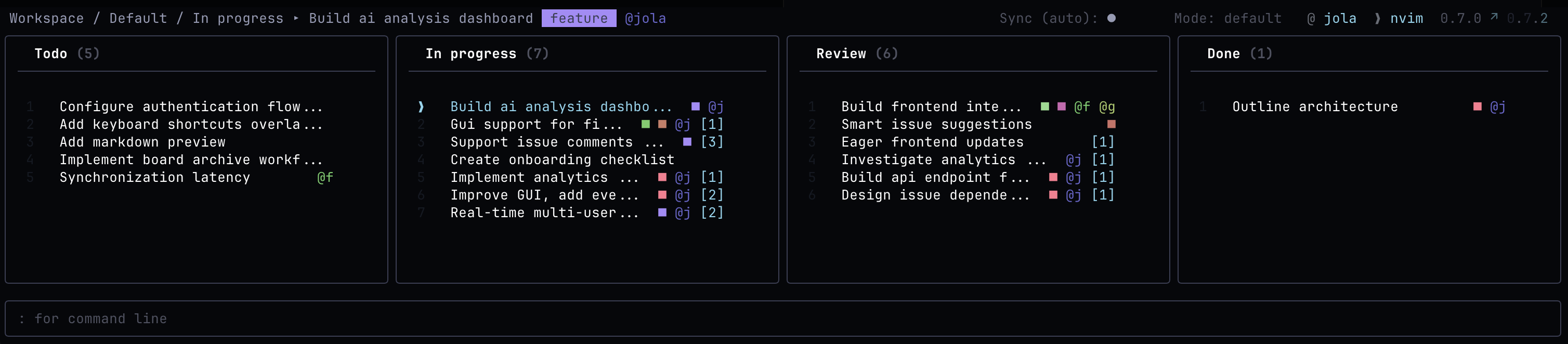
Developers are most productive in their editors. Stay close to the tools you already use.
Born in the terminal, epiq also features a powerful browser interface, getting everyone on board.
epiq optimizes for flow: keyboard navigation, command history, filters, autocompletion, and plain Git synchronization.
Navigate boards, issues, swimlanes, and contexts with vim-like movement. Or cheat with arrow keys. Or launch the browser app.
epiq uses Git under the hood, with isolated worktrees and state branches, so teams can collaborate without another central service.
In an age where agents run whole sprints, ability to replay the board is increasingly important to stay in the loop. Inspect what happened 1h, 1 week, or one year ago.
epiq takes its own path. Instead of a centralized, managed service, project state lives alongside your repository and travels with it.
Code, plan, review, retrospect issues without context-switching. epiq keeps local interaction instant while allowing you to sync explicitly or automatically.
# launch inside any Git repo
epiq

# launch as browser GUI
epiq gui

# create work from the terminal
:new issue Add keyboard shortcuts

# narrow the board
:filter tag prio

# synchronize state
:sync"Issue tracking should be smooth."
- probably someoneInstall the single binary then enter any Git repository and run epiq. First launch opens an interactive setup wizard. Then either stay in your terminal or launch the browser GUI.
cd your-existing-repo-with-remote-tracking
epiq